Guide
13 Task Management Softwares: Which Fits Your Team?
BatchBrief · Published November 6, 2026 · Updated November 12, 2026
A practical guide to choosing a task manager for your actual workday—from personal checklists to private assignments and complex cross-team projects.
By the BatchBrief team | Updated November 2026 | Research-based comparison
It's Monday morning. There are assignments in a spreadsheet, updates in chat, reminders in an inbox, and a status meeting on the calendar. Nobody is necessarily working too slowly. The harder problem is that it's unclear who owns what, what happens next, and where to check progress.
Task management software can help—but the wrong tool can add a new layer of admin work. A personal checklist is not a shared project plan. A Kanban board is not the same as a private queue for contractors. And a system designed for software releases may be excessive for assigning everyday office tasks.
This guide compares 13 task management tools against the situations working people actually face: distributing work, keeping personal priorities straight, collaborating on shared deliverables, managing dependencies, and keeping subscription costs predictable.
Disclosure: This article is published by BatchBrief, one of the products included. We have a clear point of view about private batch assignment, but it is not the right answer to every task problem. The comparison draws on publicly documented product features, workflows, and pricing—not weeks of hands-on testing with all 13 products. We highlight competitors when their approach is a better fit.
Start with the work, not a list of features. Here are practical starting points, not a universal ranking.
| Your everyday challenge | Worth considering | Why it fits |
|---|---|---|
| Assign a large list; each person should see only their tasks | BatchBrief | Bulk assignment and private receiver lists |
| Collaborate on shared projects at a flat team price | ProofHub | Project discussions, files, timelines and approvals |
| Run a shared team board on a limited budget | Plaky | Free shared workspaces with unlimited users |
| Remember personal tasks and recurring commitments | Todoist / Microsoft To Do | Quick capture, reminders and daily lists |
| Follow a visual workflow or keep briefs near tasks | Trello / Notion | Kanban boards / connected docs and databases |
| Break a big project into layers of work | Quire | Nested tasks and subtasks |
| Coordinate multi-team plans, deadlines or software releases | Asana, ClickUp, monday.com, Wrike, Jira | Planning, configuration, reporting or delivery controls |
First, figure out which task problem you actually have
There are three questions worth answering before anyone signs up: Who needs to see the work? Does the entire team collaborate on the same project, or should each person only see their own assignments? How connected are the tasks? Are they independent items, or does one deliverable block another? Who manages the system? A tool that takes hours to configure can be a good investment for a complex project and wasted effort for a straightforward weekly task list.
For example, a recruiting coordinator splitting 70 candidate profiles among reviewers needs a very different workflow from a product manager coordinating a launch across five departments. Both need accountability; they do not need identical software.
For assigning and coordinating work
1. BatchBrief — for distributing lists into private assignments
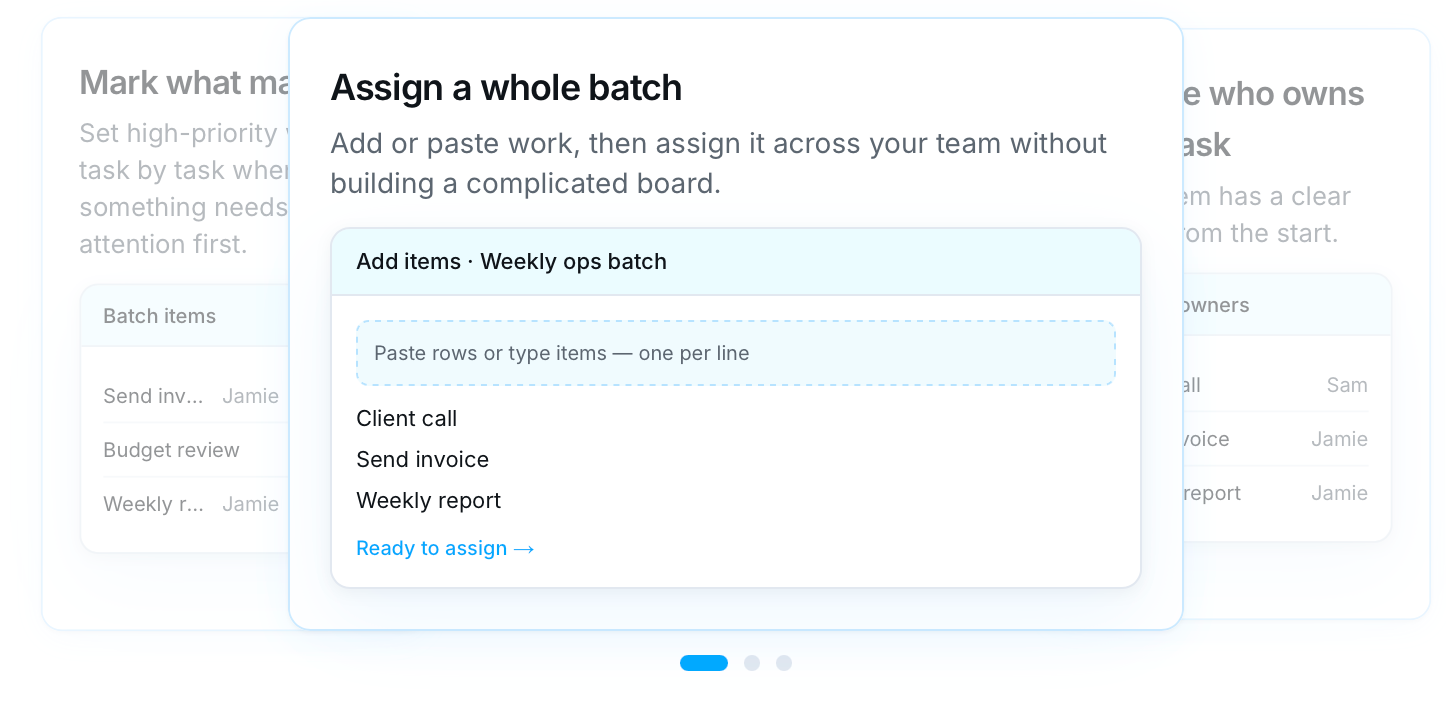
Consider a team lead with 100 accounts to check, an HR coordinator reviewing applicants, or an operations manager splitting a weekly queue across colleagues. The starting point is a list, not a project plan. BatchBrief is designed around that one workflow: paste the items, assign them to people, and let each receiver work from a private list.
The assigner keeps a master view of items, owners and progress. Receivers sign in to see only the work assigned to them and can update statuses, notes and deliverable links. The privacy boundary is enforced server-side, rather than relying only on filtered board views. Tasks can be distributed evenly, assigned to one person, or left unassigned until later. See the workflow.
Where it works well: Repetitive work such as audits, outreach follow-ups, applicant screening, content reviews, or operations checks. It is particularly relevant when one coordinator needs oversight while individual contributors should not browse everyone else’s items.
Where it does not fit: BatchBrief is not intended to replace full project-management suites with Gantt planning, task dependencies, advanced automation, or cross-department resource planning. Import is designed around pasting item lists; CSV export is available, but it is not a multi-column CSV import tool.
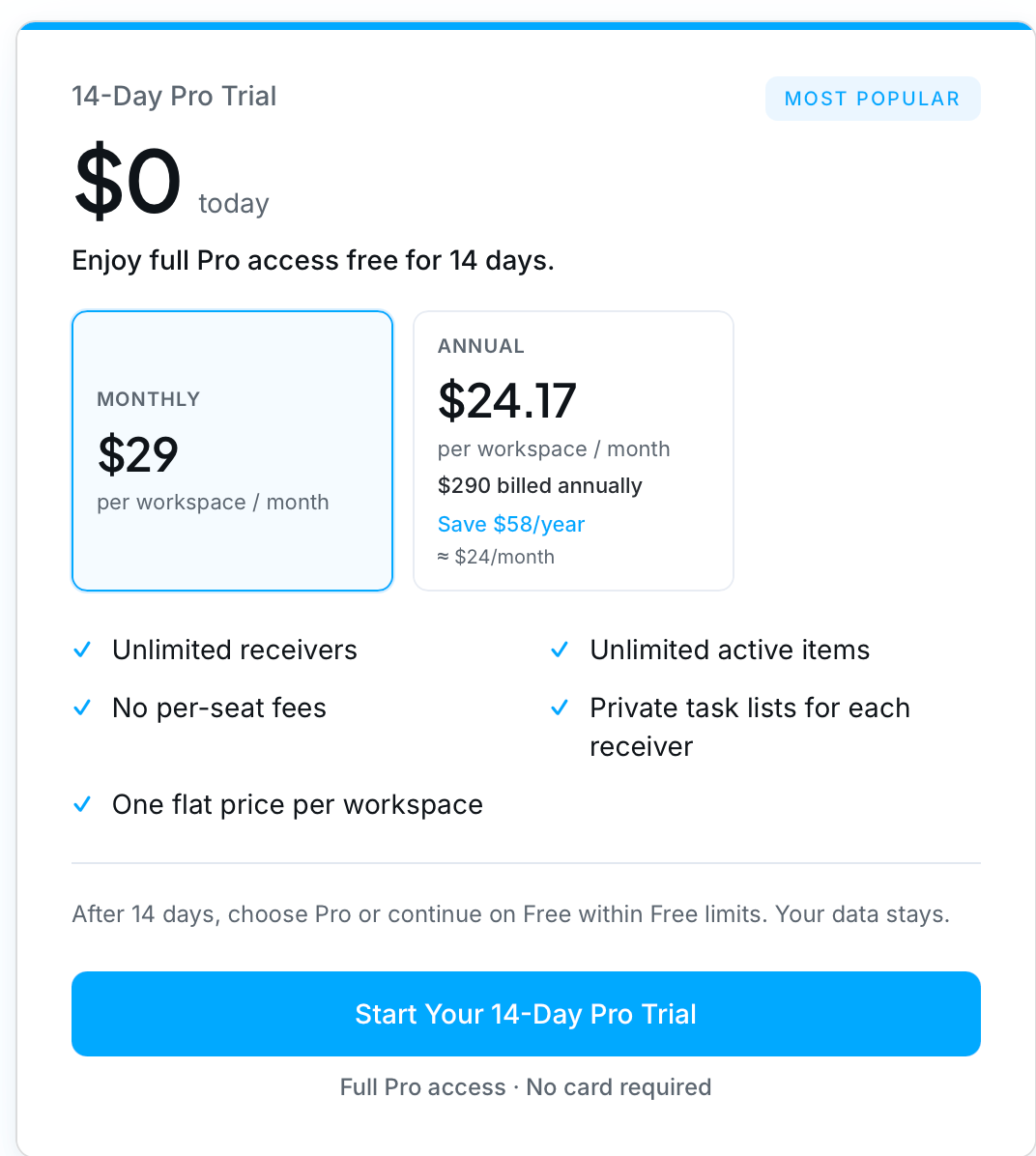
Pricing: Pro costs $29 per workspace/month or $290/year, with unlimited receivers and active items. Eligible new workspaces get a 14-day Pro trial, no credit card required. Afterward, Free supports up to 2 receivers and 20 active items; completed items free up active-item capacity. See BatchBrief pricing.
Our view: If your main headache is handing out many independent tasks privately and keeping an eye on completion, BatchBrief deserves a trial. If every teammate must co-edit a shared project plan, start by looking at a broader collaboration product.
2. ProofHub — for shared client and project work
ProofHub combines tasks with discussions, calendars, files, review cycles and approvals. That makes sense for an agency where a writer, designer and client need to work on the same deliverable rather than in separate private queues.
Its flat-rate pricing is also relevant for teams that dislike per-seat billing. The Essential plan is listed at $45/month billed annually, with unlimited users and a 40-project limit; more advanced roles and workflow features sit on higher plans. See official pricing.
Trade-off: More collaboration capability also brings more project structure. For simple assignment of independent work items, it could be more system than your team needs.
3. Plaky — for a free, visible team workspace
A community organization, small business or growing team may mainly need a shared place where work can be assigned and tracked. Plaky offers a Free plan with unlimited users, boards and items, making it worth considering before paying for team seats.
Its board-based approach works well when team members are expected to see shared progress. But access rules matter: private boards and more granular access are paid features, not part of the standard Free setup. Check plan permissions.
Trade-off: Free shared visibility and private-by-default individual assignments solve different problems. Verify the privacy model with real test accounts before adopting any tool for sensitive or separated work.
For personal productivity and visible teamwork
4. Todoist — for recurring work and personal priorities
Todoist helps individuals capture tasks quickly, schedule recurring responsibilities, and prioritize a crowded day. A salesperson can keep follow-ups moving; an administrator can track recurring checks without needing a project dashboard.
Team workspaces are available on paid plans, but Todoist is especially compelling when each person wants a lightweight daily system. Official pricing lists a Free option and paid individual and team plans.
Trade-off: Good personal habits do not automatically solve bulk assignment, strict separation of assignments, or complex project dependencies.
5. Microsoft To Do — for a straightforward daily checklist
Microsoft To Do focuses on lists, due dates, reminders and a “My Day” view. It fits people who already spend their day in Microsoft 365 and just need a reliable place for the next action.
It is available free on supported platforms and integrates with Microsoft task workflows. That makes it a sensible first stop before committing the office to another subscription.
Trade-off: It is a personal task organizer with basic sharing, not a replacement for detailed team reporting or structured project delivery.
6. Trello — for teams who think in cards and columns
Trello makes the status of work easy to see: ideas move from To Do to In Progress to Review to Done. Marketing teams can track campaigns, editorial teams can move articles through production, and smaller groups can adopt it without learning complicated terminology.
Cards can hold checklists, comments, attachments and dates. The visual shared-board model is the appeal; it is less natural when there are hundreds of independent assignments or when contributors must not see one another’s work. Review pricing and workspace rules.
Trade-off: A busy board can become a wall of cards. Check guest access and permissions rather than assuming a board filter provides privacy.
7. Notion — for tasks closely connected to knowledge
Notion brings documents, notes, databases and tasks into a flexible workspace. If an assignment needs a brief, reference links, meeting notes and a draft, storing that context close to the work can reduce switching between apps.
That flexibility has a cost in setup and governance. Someone must define the templates, views, database structure and access controls. More advanced database permissions can be available on higher tiers, but need deliberate configuration. See plans.
Trade-off: Notion works best when your team wants a flexible knowledge-and-work hub, not merely a fast way to hand out a list.
8. Quire — for tasks that have many levels
Some work needs to be broken down before it can be assigned. Planning a conference includes venues, speakers, registration, promotion and dozens of nested steps. Quire is useful here because hierarchical tasks keep each small action connected to a larger objective.
The Free plan supports smaller teams and a limited number of projects, while paid plans expand capacity and features. See official plans.
Trade-off: A detailed hierarchy can add unnecessary overhead if the job is simply to divide 200 independent customer records among reviewers.
For connected projects, operational processes and engineering
9. Asana — for work with dependencies and handoffs
Asana is a strong candidate when several teams share milestones. Timelines, dependencies, reporting, forms and project views help clarify what cannot start until something else is finished. This matters for launches, campaigns and multi-department initiatives.
Asana Starter is listed at $10.99 per paid user/month billed annually. Eligible external guests can collaborate without necessarily taking a paid member seat, so the actual bill depends on roles. See official pricing.
Trade-off: Good project structure takes ownership and maintenance. That is justified when the dependencies are real, but not every checklist needs a project operating system.
10. ClickUp — for teams that want a configurable work hub
ClickUp combines tasks with documents, dashboards, fields, time tracking, automations and multiple ways to view work. Teams with different functions—marketing, design, operations and development—can set up processes that suit each group.
The Free Forever tier has feature and storage limits; Unlimited is listed at $7 per user/month billed annually, while Business adds more controls. See current plans.
Trade-off: The feature range is valuable if someone can design and maintain the workspace. Without conventions, customization can become another task to manage.
11. monday.com — for repeatable business processes
monday.com suits processes where work moves through stages: onboarding customers, managing campaigns, or handling requests across departments. Structured boards, forms, dashboards and automation help teams standardize how work is received and completed.
It can be a better match than private assignments when several people need visibility into the same operational process. Pricing is seat-based, and bundles, guest rules and plan selection may affect the total. See pricing.
Trade-off: Stronger process visibility and customization are useful for ongoing operations, but can feel heavy for a small, one-off delegation task.
12. Wrike — for complex client and agency delivery
Wrike is aimed at teams balancing many deliverables, reviewers, deadlines and client projects. Depending on the plan, Gantt views, request forms, proofing and resource tools can make it easier to see what is late or overloaded.
It is worth evaluating when missed handoffs have a real business cost. Seat packages and annual billing conditions can make final pricing different from a simple advertised price multiplied by headcount. Check official pricing.
Trade-off: For a single coordinator handing out independent records, Wrike may be more sophisticated than necessary.
13. Jira — for technical issues, sprints and releases
Jira has a specific strength: tracking software work, including issues, backlogs, sprint planning, releases and relationships among technical tasks. Engineering teams often need that traceability rather than a generic checklist.
Its Free option supports smaller groups, with paid tiers based on team size and requirements. Use Atlassian’s pricing calculator for current costs.
Trade-off: Jira can be the right answer for a software release while being unnecessarily complex for distributing weekly follow-up tasks to nontechnical colleagues.
What will task management software cost as a team grows?
Published starting prices can be deceptive when products charge for different roles or solve different problems. The examples below illustrate subscription models, not equivalent feature packages. A free shared board is not identical to a private-assignment workspace, and a fully featured paid project manager is not the same as a receiver-only role.
| Example plan / billing | 10 people | 50 people | How the example is calculated |
|---|---|---|---|
| BatchBrief Pro · monthly | $29 | $29 | One workspace; 1 assigner and 9 / 49 receivers |
| ProofHub Essential · annual | $45 | $45 | Flat rate; up to 40 projects on Essential |
| Plaky Free | $0 | $0 | Free shared workspace; privacy controls differ |
| Trello Standard · annual | $50 | $250 | $5 × 10 / 50 paid members |
| Todoist Business · annual | $80 | $400 | $8 × 10 / 50 paid members |
| ClickUp Unlimited · annual | $70 | $350 | $7 × 10 / 50 paid members |
| Asana Starter · annual | $109.90 | $549.50 | $10.99 × 10 / 50 paid members |
Pricing note: USD figures use publicly listed plan prices checked in November 2026; “annual” means the monthly equivalent when billed annually. Taxes, contracts, regional terms, promotions, guests, viewers, feature limits and seat bundles may change what you actually pay. Always confirm at checkout. In particular, Asana guest rules and other limited-access roles can reduce the number of paid seats required.
The more useful calculation is total cost of ownership: subscription fees plus the time spent configuring workflows, maintaining permissions, teaching new users and chasing updates. A $0 plan can be excellent if it handles your requirements; a paid tool can be worth it if it removes real coordination work.
How to choose: a 30-minute pilot instead of a long feature debate
You can often learn more from a real assignment than from another comparison chart. Try this small exercise with whichever two or three tools best fit your situation:
- Use a real sample. Put 10–20 actual work items into the system, not imaginary demo tasks.
- Include two roles. Have one coordinator and at least one contributor sign in separately to see exactly what each role can access.
- Test the awkward moment. Reassign something, mark an item complete, attach a deliverable, and check whether the owner can tell what changed.
- Look for workarounds. If somebody still copies spreadsheet rows or messages colleagues individually for updates, ask what the tool is not solving.
- Price the real team. Count paid administrators, members, receivers, free guests and viewers according to each vendor’s rules.
Then choose the tool that makes the core workflow simpler for the people who will use it. The broadest feature set does not always produce the lowest-friction workday.
Frequently asked questions
What is the best task management software for a small team?
There is no single winner. For one manager distributing private lists, consider BatchBrief. For a visible shared board, start with Trello or Plaky. For connected projects and dependencies, compare Asana and ClickUp. For day-to-day individual reminders, Todoist or Microsoft To Do may be enough.
Do all task management apps charge per user?
No. BatchBrief charges per workspace for its private assignment workflow, and ProofHub offers flat-rate team plans. Other services charge per paid member or offer a mix of free guests, viewers, and paid seats. The differences are important for larger teams.
Is a filtered task board the same as a private task list?
Not necessarily. A filter can change what a person sees by default without limiting what the account is allowed to access. If confidentiality or separation matters, test actual role-based permissions with another login.
Should we replace our current project management tool?
Only if it fails the work you need it to do. Some teams use a broad project tool for launches and a lightweight system for repeated assignments. Avoid adding another app unless it removes more effort than it creates.
Final takeaway: fit matters more than feature count
Different teams work in different ways, and the strongest tool for one job can be the wrong tool for another. Todoist and Microsoft To Do are good places to simplify personal work. Trello, Notion and Plaky support visible collaboration in different ways. ProofHub, Asana, ClickUp, monday.com and Wrike offer broader coordination. Quire helps break down large goals. Jira focuses on software delivery.
BatchBrief makes a narrower promise: when your work begins as a list that needs to be divided across people, you can assign it in one workflow, give each person a private place to work, and keep the full progress view as the assigner. That is an intentional alternative to asking everyone to navigate the same complicated project board.
If that sounds like your weekly workflow, try BatchBrief with one real batch on the 14-day Pro trial—no card required. If your work requires dependencies, shared editing, or sophisticated resource planning, one of the broader tools in this guide is likely a better starting point.
Sources: Official product sites and pricing pages linked throughout. Product availability and pricing may change after publication.
Assign the next batch privately
Start your 14-day Pro trial and split a list so each person only sees their own rows. No card required.